trefolio Leaf: A Dedicated AMOLED Display for Your Portfolio
A compact AMOLED device that shows your portfolio value, top holdings, and AI insights at a glance. WiFi connected, OTA updates, and a free year of trefolio Pro.
Your Portfolio, Always Visible
Checking your portfolio shouldn't require unlocking your phone, opening an app, and waiting for it to load. What if your portfolio value, top holdings, and market status were always visible — sitting on your desk, always on, always up to date?
That's trefolio Leaf: a compact AMOLED display that connects to your trefolio account over WiFi and shows your portfolio data in real time. It's a dedicated financial display for investors who want a glanceable overview without the distractions of a phone or browser.
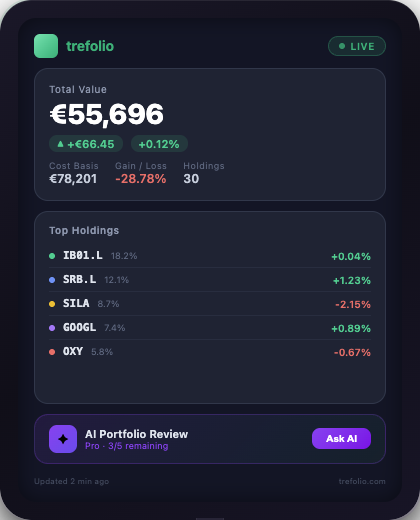
What the Leaf Shows
The trefolio Leaf cycles through several screens:
- Portfolio value — total value, daily change (amount and percentage), and an intraday sparkline chart
- Top holdings — your largest positions with current price and daily change
- AI insights — a summary of your portfolio's health from trefolio's AI analysis
- Market status — whether major exchanges (NYSE, XETRA, LSE) are open or closed, plus key index movements
Each screen is designed for readability at arm's length — large fonts, high-contrast AMOLED colors, and minimal clutter.
Hardware Specs
- Display — AMOLED, vibrant colors with true blacks. Readable in any lighting condition.
- Processor — ESP32-S3 (LILYGO T4-S3) with WiFi connectivity
- Connectivity — 2.4 GHz WiFi. Connects to your home or office network via a captive portal setup.
- Power — USB-C powered. Sits on your desk next to your monitor.
- Updates — over-the-air (OTA) firmware updates. New features and improvements delivered automatically.
Setup in 3 Minutes
- Power on — plug in the Leaf via USB-C.
- Connect to WiFi — the Leaf creates a WiFi hotspot. Connect from your phone, enter your home WiFi credentials, and it connects automatically.
- Link your trefolio account — scan a QR code or enter a pairing code in trefolio. The Leaf pulls your portfolio data and starts displaying.
That's it. No app to install, no Bluetooth pairing, no complex configuration.
Free Year of trefolio Pro
Every trefolio Leaf purchase includes a full year of trefolio Pro (Trefolio tier). That means unlimited holdings, AI analysis, tax reports, stock screener, portfolio simulator, and all premium features — included with your device.
Who Is It For?
The trefolio Leaf is for investors who want a persistent, distraction-free view of their portfolio:
- Desk traders who want a secondary display without giving up screen real estate
- Long-term investors who want a daily glance at their portfolio without opening apps
- Gift for investors — a unique, practical gift for anyone who follows the markets
- Home office aesthetic — a sleek device that adds information to your workspace
Join the Waitlist
The trefolio Leaf is coming soon. Create a free trefolio account and join the Leaf waitlist from your profile page. You'll be the first to know when it's available — no credit card required, no commitment. In the meantime, set up your portfolio in trefolio so it's ready to display the moment your Leaf arrives.